Introduction to Data
Agenda
- Coding Basics
- Variable Types
- Frequency Distributions
Learning objectives
By the end of the lecture, you will be able to …
- use R to conduct basic calculations/comparisons
- identify and convert variable types
- create useful frequency tables
Code-along 02
Mini-task
Install the summarytools() package, available on CRAN.
Run the code chunk in your code-along.
OR: Copy and paste the code into your Console pane. Then hit “Enter”.
Mini-task
Load the standard packages and our new summarytools() package.
Mini-task
Load the 2024 GSS data.
Coding Basics
Coding basics
You can (and should) make comments in your code
Object names must start with a letter and can only contain letters, numbers, _, and .
i_use_snake_case
otherPeopleUseCamelCase
some.people.use.periods
And_aFew.People_RENOUNCEconventionCoding basics: demo
Operators in R
Operators in R are symbols directing R to perform various kinds of mathematical, logical, and decision operations. A few of the key ones to know before we get started:
Assignment operators assign values to variables:
<-, ->, =
Comparison operators test equality or inequality:
==, !=, >, >=, <, <=
Logical operators indicate “and”, “or”, and “not”:
&, |, !
Comparison operators
| operator | definition |
|---|---|
< |
is less than? |
<= |
is less than or equal to? |
> |
is greater than? |
>= |
is greater than or equal to? |
== |
is exactly equal to? |
!= |
is not equal to? |
Comparison operators (cont)
Logical operators
| operator | definition |
|---|---|
x & y |
is x AND y? |
x | y |
is x OR y? |
is.na(x) |
is x NA? |
!is.na(x) |
is x not NA? |
Logical operators (cont)
Mini-task
Make a tiny data frame and save it.
# A tibble: 5 × 2
      x y
  <dbl> <chr>
1     1 a
2     2 a
3     3 b
4     4 c
5     5 c
Variable Types
Data types in R
A property is assigned to objects that determines how generic functions operate with it.
Common ‘types’ or ‘classes’ of variables:
- logical
- character
- integer
- numeric
- and more, but we won’t be focusing on those
Data class + variable type
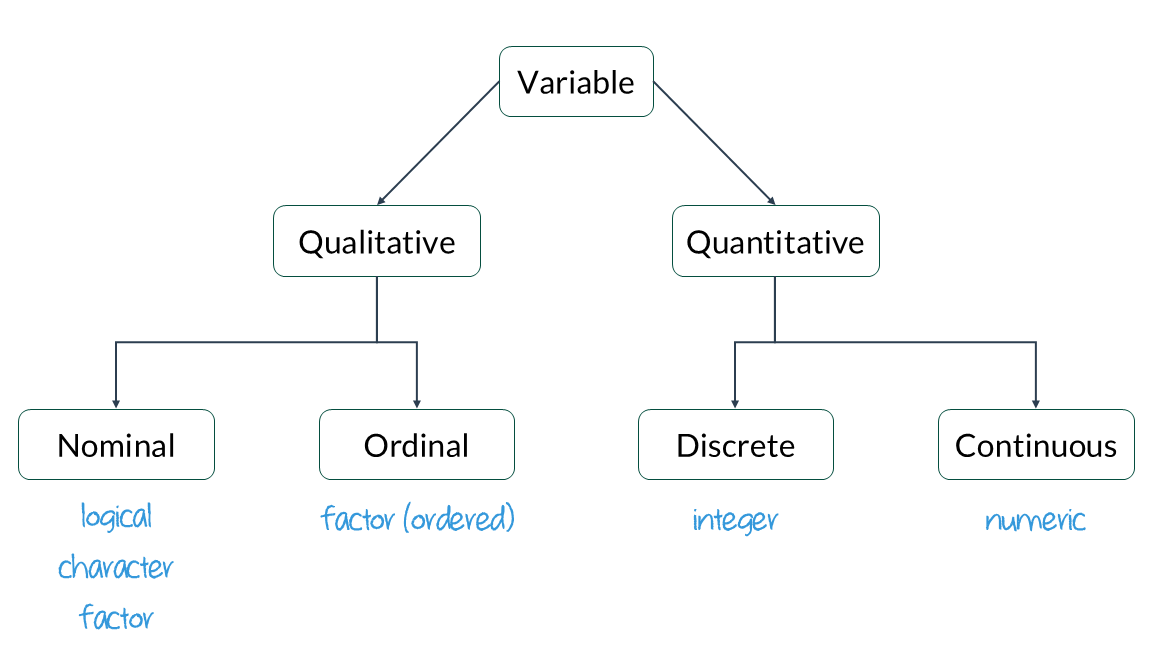
class()
Factor
factors consist of character data with a fixed and known set of possible values
[1] "factor"Factor order
Converting between types
Use a function: as.logical(), as.numeric(), as.integer(), or as.character().
Haven labelled
When you import data into R from software like SPSS, Stata, or SAS, you might notice a special class called haven_labelled.
Haven labelled cont.
It makes data easier to understand without needing a separate codebook.
- 1
- A description of the variable
- 2
- View the label attached to each numeric value
[1] "sex before marriage"

Labels:
 value                         label
     1                  always wrong
     2           almost always wrong
     3          wrong only sometimes
     4              not wrong at all
     5                         other
 NA(d)                    don't know
 NA(i)                           iap
 NA(j)            I don't have a job
 NA(m)                   dk, na, iap
 NA(n)                     no answer
 NA(p)                 not imputable
 NA(r)                       refused
 NA(s)                skipped on web
 NA(u)                    uncodeable
 NA(x) not available in this release
 NA(y)    not available in this year
NA(z) see codebookYou can use as_factor to see the value labels of the variable premarsx.
Use as_factor() inside the table() function for the variable premarsx
                 always wrong           almost always wrong
                          357                           122
         wrong only sometimes              not wrong at all
                          258                          1378
                        other                           iap
                            0                          1126
                   don't know            I don't have a job
                           50                             0
                  dk, na, iap                     no answer
                            0                             6
                not imputable                       refused
                            0                             0
               skipped on web                    uncodeable
                           12                             0
not available in this release    not available in this year
                            0                             0
                 see codebook
0 Convert labels to factors
1. Use zap_missing() to get rid of all the ‘missing’ (NA) levels
2. Use as_factor() to apply the labels instead of numeric values
Mini-task
Use zap_missing(), as_factor(), & droplevels() on the variable sex.
Frequency Distributions
Relative frequency table
Let’s try functions from the summarytools() package to get univariate (1 variable) and bivariate (2 variables) descriptive statistics.
freq() creates table of the counts for a variable.
Frequencies
gss24$sex
Type: Factor

               Freq   % Valid   % Valid Cum.   % Total   % Total Cum.
------------ ------ --------- -------------- --------- --------------
        male   1467     44.59          44.59     44.33          44.33
      female   1823     55.41         100.00     55.09          99.43
        <NA>     19                               0.57         100.00
Total 3309 100.00 100.00 100.00 100.00Mini-task
Use freq() on the variable premarsx
Frequencies
gss24$premarsx
Type: Factor

                             Freq   % Valid   % Valid Cum.   % Total   % Total Cum.
-------------------------- ------ --------- -------------- --------- --------------
              always wrong    357     16.88          16.88     10.79          10.79
       almost always wrong    122      5.77          22.65      3.69          14.48
      wrong only sometimes    258     12.20          34.85      7.80          22.27
          not wrong at all   1378     65.15         100.00     41.64          63.92
                      <NA>   1194                              36.08         100.00
                     Total   3309    100.00         100.00    100.00         100.00
Pretty tables
One of summarytools main purposes is to help clean and prepare data for further analysis. But sometimes we don’t care about the missing values.
Using report.nas = FALSE suppresses the missing data.
The headings = FALSE parameter suppresses the heading section.
               Freq        %   % Cum.
------------ ------ -------- --------
        male   1467    44.59    44.59
      female   1823    55.41   100.00
       Total   3290   100.00   100.00
Mini-task
Make a pretty frequency table for the variable premarsx.
Cross-tabs
We’ve been using the table() function with one variable at a time, but it also let’s you create a frequency table (crosstab) with two variables.
                       male female
  always wrong          146    209
  almost always wrong    44     77
  wrong only sometimes  127    130
  not wrong at all      616    758
But it’s missing the column percentages…
Relative frequency by group
To run freq() by group, pair it with the stby() function.
Frequencies
gss24$premarsx
Type: Factor
Group: sex = male

                             Freq   % Valid   % Valid Cum.   % Total   % Total Cum.
-------------------------- ------ --------- -------------- --------- --------------
              always wrong    146     15.65          15.65      9.95           9.95
       almost always wrong     44      4.72          20.36      3.00          12.95
      wrong only sometimes    127     13.61          33.98      8.66          21.61
          not wrong at all    616     66.02         100.00     41.99          63.60
                      <NA>    534                              36.40         100.00
                     Total   1467    100.00         100.00    100.00         100.00

Group: sex = female

                             Freq   % Valid   % Valid Cum.   % Total   % Total Cum.
-------------------------- ------ --------- -------------- --------- --------------
              always wrong    209     17.80          17.80     11.46          11.46
       almost always wrong     77      6.56          24.36      4.22          15.69
      wrong only sometimes    130     11.07          35.43      7.13          22.82
          not wrong at all    758     64.57         100.00     41.58          64.40
                      <NA>    649                              35.60         100.00
                     Total   1823    100.00         100.00    100.00         100.00
This is hard to read and we don’t need the cumulative frequencies.
Pretty cross-tabs with ctable()
Use summarytools::ctable instead!
- 1
-
Change from
table()toctable(). - 2
- The “c” gives column %; “r” would give row %.
- 3
- This adds the % symbols to the table.
- 4
- Exclude the missing levels from the table.
Cross-Tabulation, Column Proportions
premarsx * sex
Data Frame: gss24

---------------------- ----- -------------- --------------- ---------------
                         sex           male          female           Total
              premarsx
          always wrong         146 ( 15.6%)    209 ( 17.8%)    355 ( 16.8%)
   almost always wrong          44 (  4.7%)     77 (  6.6%)    121 (  5.7%)
  wrong only sometimes         127 ( 13.6%)    130 ( 11.1%)    257 ( 12.2%)
      not wrong at all         616 ( 66.0%)    758 ( 64.6%)   1374 ( 65.2%)
                 Total         933 (100.0%)   1174 (100.0%)   2107 (100.0%)
---------------------- ----- -------------- --------------- ---------------Based on your table, what percentage of respondents believe sex before marriage is ‘almost always wrong’?
- 5.7
- 16.8
- 121
- 12.2
Based on your table, do a greater percentage of men or women think sex before marriage is ‘not wrong at all’?
- Men
- Women